Home
Home  Navigation


Mastering Minecraft Mob Elimination: A Guide to the /kill Command
There are many reasons to eliminate mobs in Minecraft. The easiest method utilizes commands, specifically the /kill command. However, this seemingly simple command has nuances. This guide explains how to target and eliminate mobs effectively.
Prerequisites: Enabling Cheats
Before using any kill commands, ensure your Minecraft world has cheats enabled. The instructions below differ slightly depending on your edition:
Java Edition:
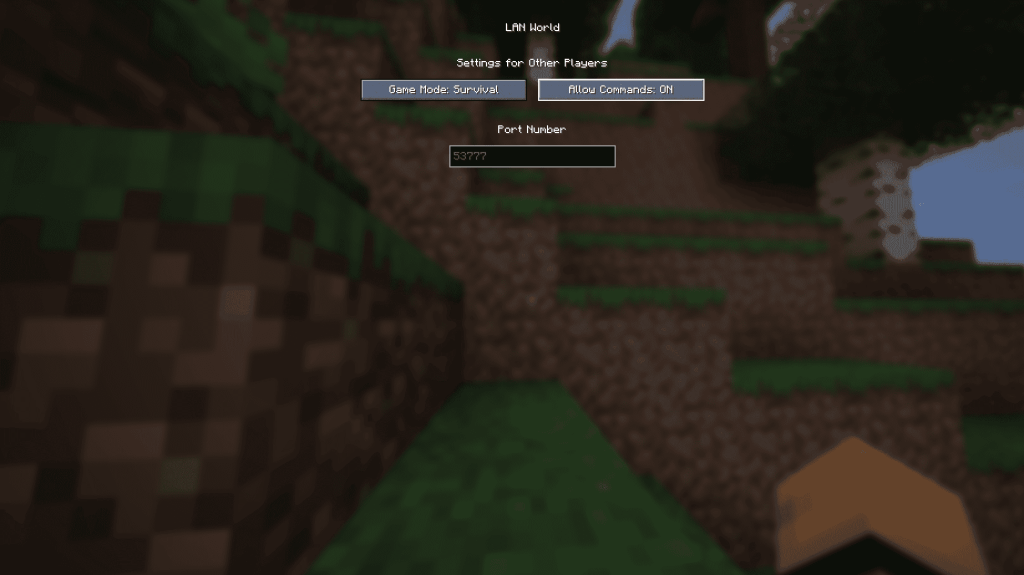
- Enter your world.
- Press Esc.
- Select "Open to LAN."
- Toggle "Allow Commands" to "On."
Commands will now function in your world, but you must repeat this process each time you load the world. To permanently enable cheats, create a world copy with cheats enabled using the "Re-create" option in the singleplayer world selection menu.
Bedrock Edition:
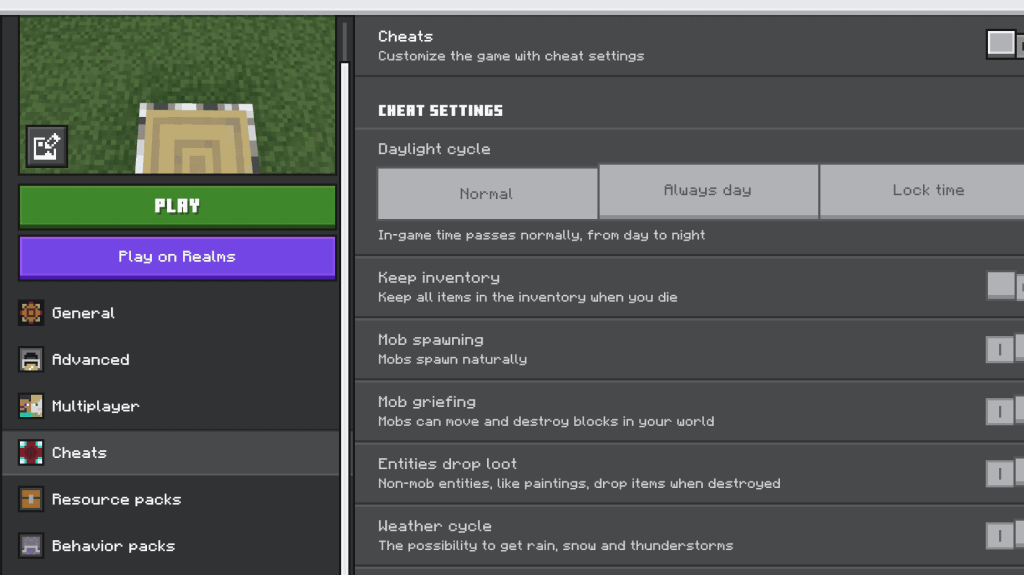
- Locate your worlds.
- Select the world and click the pencil icon.
- In the settings menu, toggle "Cheats" to "On."
Utilizing the /kill Command
The /kill command's basic syntax is straightforward, but adding selectors provides precise control:
-
/kill @e[type=!minecraft:player]– Eliminates all entities except the player. -
/kill @e[type=minecraft:chicken]– Eliminates all chickens. -
Java Edition:
/kill @e[distance=..15]– Eliminates all entities within 15 blocks. -
Bedrock Edition:
/kill @e[r=10]– Eliminates all entities within 10 blocks. -
Java Edition:
/kill @e[distance=..15,type=minecraft:sheep]– Eliminates all sheep within 15 blocks. -
Bedrock Edition:
/kill @e[r=10,type=minecraft:sheep]– Eliminates all sheep within 10 blocks.
The game autocompletes commands, minimizing memorization.
Important Selectors:
Understanding these selectors is crucial for targeted mob elimination:
@p– Nearest player@r– Random player@a– All players@e– All entities@s– Yourself
With practice, you'll master the /kill command and efficiently manage Minecraft's mob population. Minecraft is available on PlayStation, Xbox, Nintendo Switch, PC, and mobile devices.
 Latest Articles




 Latest Games




![Chubby Story [v1.4.2] (Localizations)](https://imgs.xddxz.com/uploads/85/1719638042667f981a5e9f8.jpg)

![Zia – New Version 0.4 [Studio Zia]](https://imgs.xddxz.com/uploads/47/1719569268667e8b74e6004.jpg)